Artificial intelligence can help teams reduce repetitive work, organize information, and communicate more clearly. But adopting a tool is not the same as improving work. A human-centered approach starts with the people who will use, review, and be affected by AI every day. Leaders looking for broader perspectives on this challenge can explore leading AI keynote speakers for technology conferences as they plan conversations about technology, leadership, and workplace change.
The goal is not to make every process automatic. It is to use AI where it adds value while preserving accountability, professional judgment, learning, privacy, and trust. Organizations that treat employees as partners in the change are better positioned to build workflows that people understand and want to use.
Why Human-Centered AI Matters
AI is becoming part of ordinary workplace tasks, from drafting summaries to sorting information and preparing first-pass communications. Speed can be useful, but it is not a complete measure of success. A faster process that creates inaccurate work, exposes confidential information, or leaves employees uncertain about their roles is not a better process. Human-centered AI keeps the purpose of work in view: helping people make sound decisions and serve customers, colleagues, and communities well.
Start With A Clear Workplace Problem
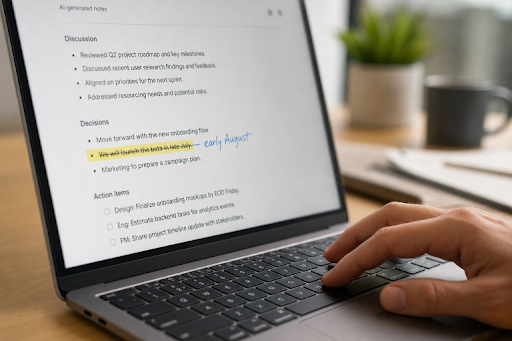
Begin with a real operational problem, not a tool demonstration. Ask employees where repetitive work causes delays, errors, or unnecessary handoffs. Then choose one goal that can be observed, such as reducing the time required to turn meeting notes into an action list. AI can organize notes and identify possible next steps, while a manager confirms priorities, owners, and deadlines. This approach gives the team a useful starting point without handing decision-making to software.
Set Rules Before Employees Need Them
Employees need practical answers before they begin using AI. Define what information may be entered into a system, which tasks require review, who can approve new tools, how errors are reported, and when AI-assisted content needs disclosure. Privacy rules should be especially clear for customer data, personnel records, financial details, and unpublished business information. The AI Risk Management Framework offers a useful structure for thinking about governance, trustworthiness, and risk throughout an AI system’s use.
Keep Human Judgment In The Loop
AI output should inform decisions, not quietly become the decision. Hiring, discipline, compensation, health-related matters, finance, and legal issues require meaningful human review. The reviewer should understand the context, check important facts, and have the authority to disagree with the recommendation. A person who only clicks “approve” is not providing real oversight. For employment-related systems, leaders should also consider how automated tools may affect fairness, accessibility, and equal opportunity under guidance on artificial intelligence and the ADA.
Build Trust Through Plain Communication
Unclear communication creates avoidable anxiety. Before a rollout, explain what the tool does, what it does not do, what information it can access, and whether duties or performance measures will change. Invite questions early, including questions that challenge the plan.
A Simple Announcement Example
“We are testing an AI tool to create first drafts of meeting summaries. It will not make performance decisions, send messages without review, or replace the manager’s responsibility for assigning work. Please report errors, unclear results, or privacy concerns so we can improve the process.”
Train Employees For Real Work, Not Just Tool Features
Knowing where to click is not enough. Employees need role-based training that helps them use AI responsibly in their actual work. Short lessons are often more useful than a single broad session because teams face different risks and decisions.
- Write clear prompts that include the needed context and constraints.
- Check facts, calculations, and cited material before sharing output.
- Spot bias, missing context, generic language, and unsupported claims.
- Protect confidential information and recognize when AI should not be used.
- Edit drafts for accuracy, tone, cultural context, and audience needs.
Design Workflows Around People And Tools
Map the existing process before changing it. Identify the steps where AI can help, name the person responsible for reviewing important output, and test the new workflow with a small group. For example, a customer service team might use AI to draft routine replies, while trained employees handle tone, exceptions, refunds, complaints, and sensitive situations. Remove any new step that adds effort without improving quality or clarity.
Measure More Than Time Saved
Time saved matters, but it should sit alongside other measures. Compare results before and after the pilot, then ask employees and customers what changed. Useful measures include:
- Quality and accuracy of final work.
- Error rates, rework, and escalation volume.
- Employee confidence and ability to do the work well.
- Customer satisfaction and clarity of communication.
- Fair access to useful tools and training across teams.
- Whether employees are gaining skills rather than losing opportunities to learn.
Protect Creativity, Learning, And Team Connection
Using AI for every first draft can weaken important habits. New employees may miss the practice that builds judgment. Teams may debate less if a generated answer arrives before people have considered the problem. Preserve room for independent thinking, peer review, skill-building assignments, and brainstorming sessions without AI. These practices help employees develop expertise and maintain ownership of the work they produce.
Use AI To Support Better Communication
AI can make communication more accessible when used carefully. Teams can use it to summarize long documents before discussion, create drafts at different reading levels, translate routine internal messages, turn meetings into action lists, and identify recurring themes in employee feedback. Every communication still needs a human check for accuracy, tone, cultural context, and private information.
Make The Rollout Small, Visible, And Adjustable
- Choose one low-risk use case. Focus on a task with a clear purpose and manageable consequences.
- Create a test group. Include regular users, a manager, technical support, and someone responsible for privacy or risk.
- Set a review period. Give the group time to encounter normal work conditions and common mistakes.
- Collect feedback. Ask what improved, what failed, and what remained unclear.
- Adjust before expanding. Update the workflow, training, and policies before introducing the tool more widely.
Common Mistakes To Avoid
- Buying a tool before defining the problem it should solve.
- Launching without clear privacy and approval rules.
- Measuring success only by cost or speed.
- Ignoring employee concerns or treating them as resistance.
- Applying one policy to every department without considering different risks.
- Allowing high-stakes decisions without meaningful human review.
Questions Leaders Should Ask Before Scaling AI
- What specific problem does this tool solve?
- Who benefits, and who could be excluded or harmed?
- What data does the system use, store, or share?
- Who checks important results and corrects errors?
- Can employees question or challenge an automated recommendation?
- How will results be evaluated after 30, 60, and 90 days?
Conclusion
A human-centered AI workplace does not reject automation. It uses automation with care and purpose. Clear goals, useful rules, honest communication, role-specific training, and meaningful review help organizations gain value from AI without losing the judgment and trust that make work matter.